Iryna Kostiuk
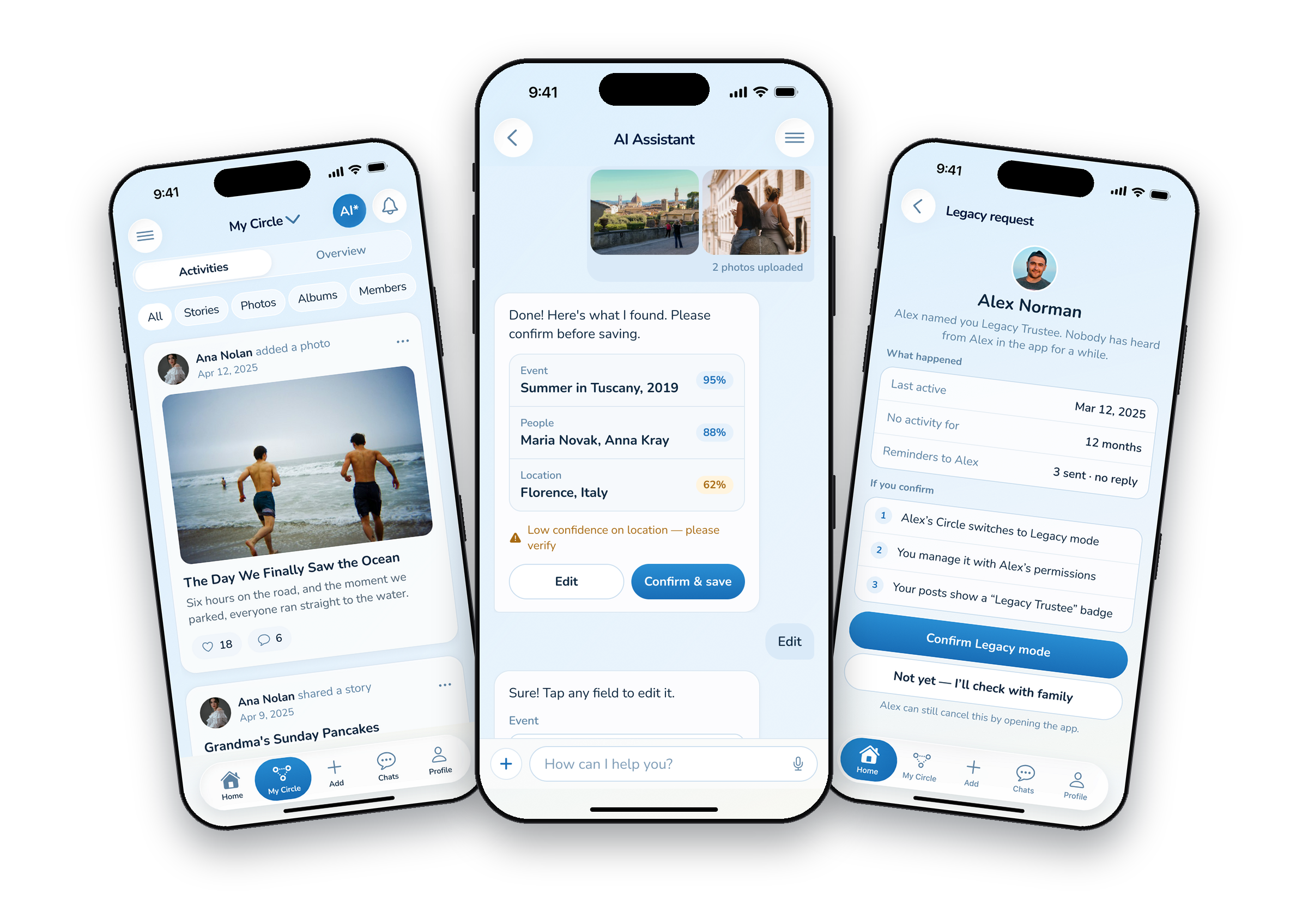
Three UI screens on black iPhones: the Memory Circle feed, AI review with confidence scores, and the Trustee’s Legacy request
The Circle feed, AI review with confidence, and the Trustee’s Legacy request — in my UI.
Challenge

A lot of AI, in a product about people you may have lost.

The brief wanted AI always on, recognising faces and names in every photo, and the product consent-first at the same time.One person owns 1 Circle and can join many others, with a different role in each — 5 roles, from Viewer to Legacy Trustee.The long-term plan was AI avatars of real people, including people who have died and can’t say yes.
Process
1

Research: reading the brief against itself

I put every requirement of the brief into a compliance matrix: what we design, what we change, and why. Read side by side, the requirements started to argue with each other — AI “always on” vs. opt-in face recognition, a public archive vs. private family memories. Some didn’t survive a phone or a privacy-first product, so each change went to the client with a reason he could agree to.

What changedStoryboards → captions, tags and AI sortingPublic archive → private profiles, found by search, link or inviteMontages → two share templatesVersion history → Phase 2
2

Structure: a role belongs to a Circle, not to a person

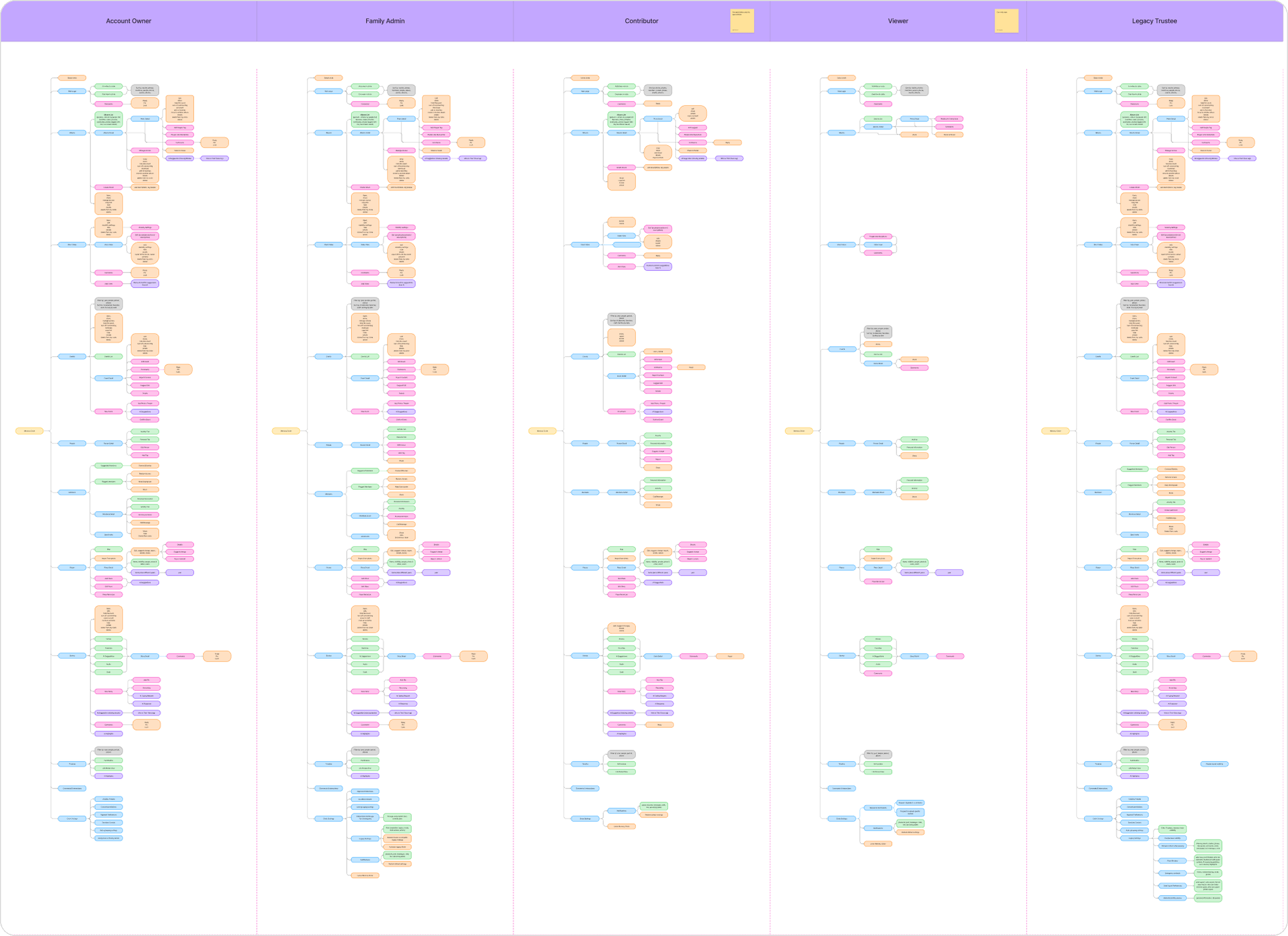
Before wireframes I wrote down who can upload, comment, report, export and take over — for the Owner, Family Admin, Contributor, Viewer and Legacy Trustee — and built the information architecture from scratch: shared parts like Home and the AI Assistant, and a separate Memory Circle for each role. The consent rules for AI avatars came from the client, and we refined them together as the flows took shape: none by default, a living person accepts for themselves, and for someone who has died the Legacy Trustee decides.
DecisionThe same aunt can be a Contributor in one family and a Viewer in another. Access lives in the Circle.
Information architecture in five columns, one Memory Circle per role: Account Owner, Family Admin, Contributor, Viewer, Legacy Trustee
The IA: one Memory Circle per role, side by side. Details hidden under NDA.
3

Flows: AI suggests, people confirm

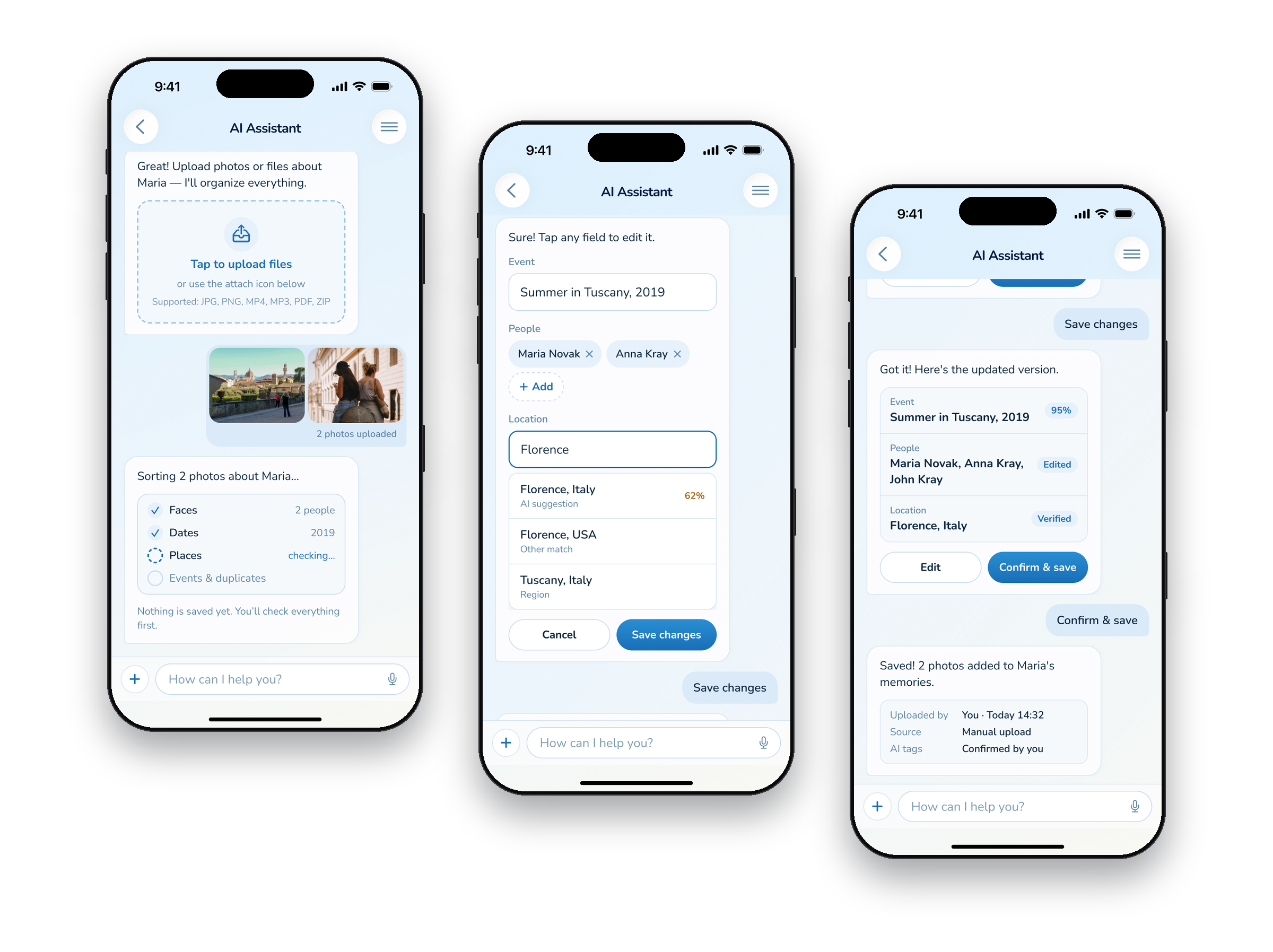
A box of old photos is exactly where AI helps: faces, dates, places, duplicates. But a wrong name under a photo of someone you lost hurts more than a wrong tag. So AI never tags anyone on its own. In the AI Assistant chat you can upload a whole batch: it groups the files, shows what it found with a confidence score, asks to “please verify” the low ones, and saves nothing until you confirm. Upload to an album the usual way and you tag people yourself; skip it, and AI looks for faces anyway — then a notification asks you to confirm who’s in the photo and brings you back to the same chat.
Trade-offOne extra step on every upload — and no wrong names under a photo.
Three UI screens of one AI Assistant chat: AI sorting two photos, editing the place with suggestions, and the saved summary with who confirmed the tags
AI sorts the batch, a person fixes what’s off, and nothing is saved until they confirm. Shown in my UI; the client got this flow as wireframes.
Prototype: uploading two photos with AI, fixing the place it wasn’t sure about, and confirming — in my UI.
The hardest decision · legacy

When the owner is gone, the plan still has to work

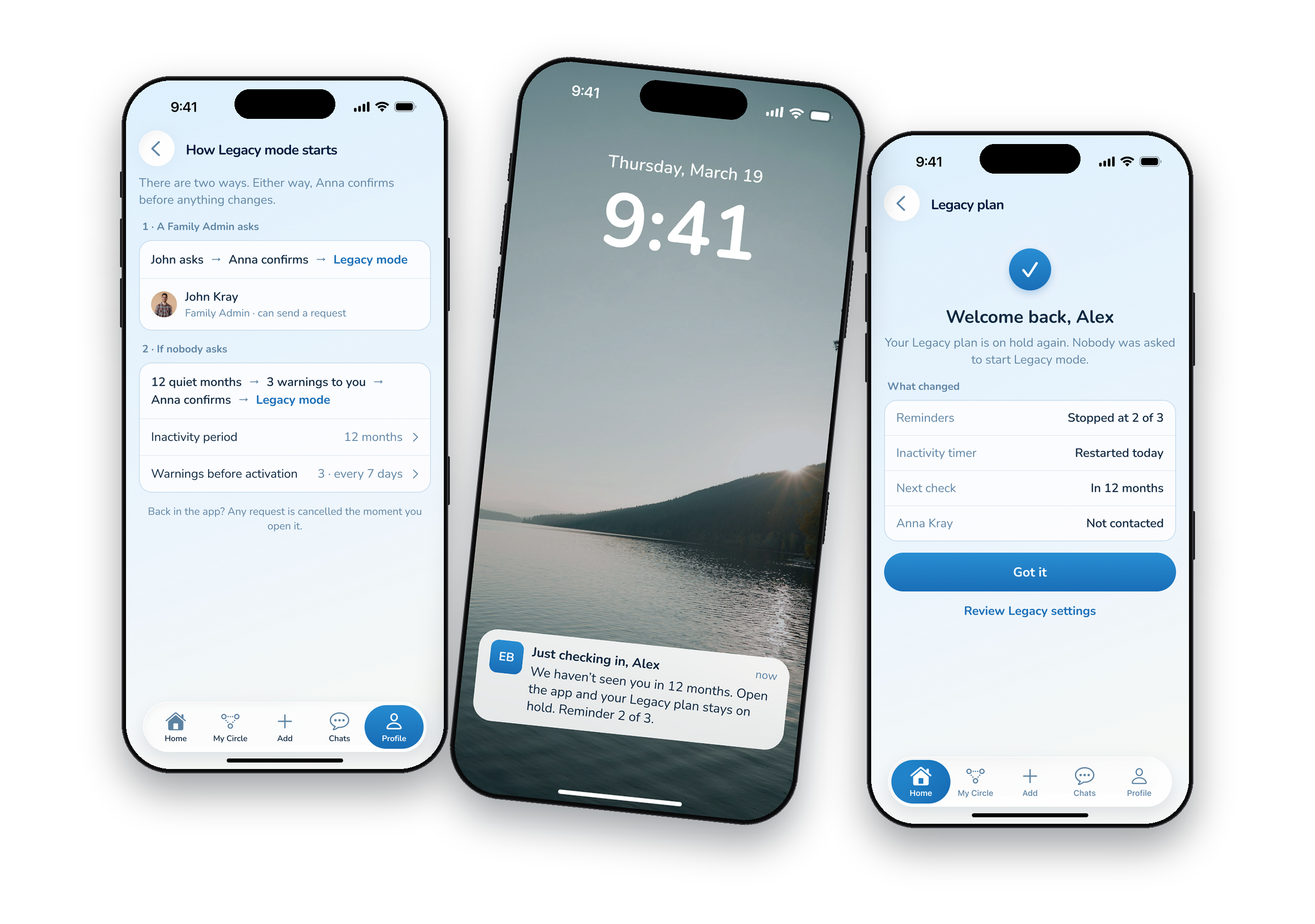
The owner names a Legacy Trustee in advance, who takes over the Circle after their death. I laid out six ways to start it, from a Family Admin request to a death certificate check. The client chose one: the Family Admin. I pushed back with one scenario — what if the admin is unavailable, in conflict, or gone too? Then the owner’s plan never runs. We agreed on a fallback: an inactivity period the owner sets in Legacy Settings. Either way, the Trustee confirms.
Trade-offTwo activation paths to build instead of one — and no plan that silently fails.
Three UI screens: how Legacy mode starts (a Family Admin request or 12 quiet months), a lock-screen reminder 2 of 3, and the welcome-back screen
Two ways to start, and the fallback: 12 quiet months, then reminders to the owner before the Trustee is asked. Opening the app puts the plan on hold. Shown in my UI; the client got these as wireframes.
4

UI: my own continuation

Flows and wireframes went to the client. The UI is my own continuation: it starts with the Home Dashboard — soft colour, real photos, and AI finds, like a possible move, that people confirm or reject right in the feed — and carries the same language into AI upload and legacy. Calm and quiet: no streaks, no badges to chase, and no “memorial” words. The client asked for “Memory Circle” everywhere, and the tone followed.
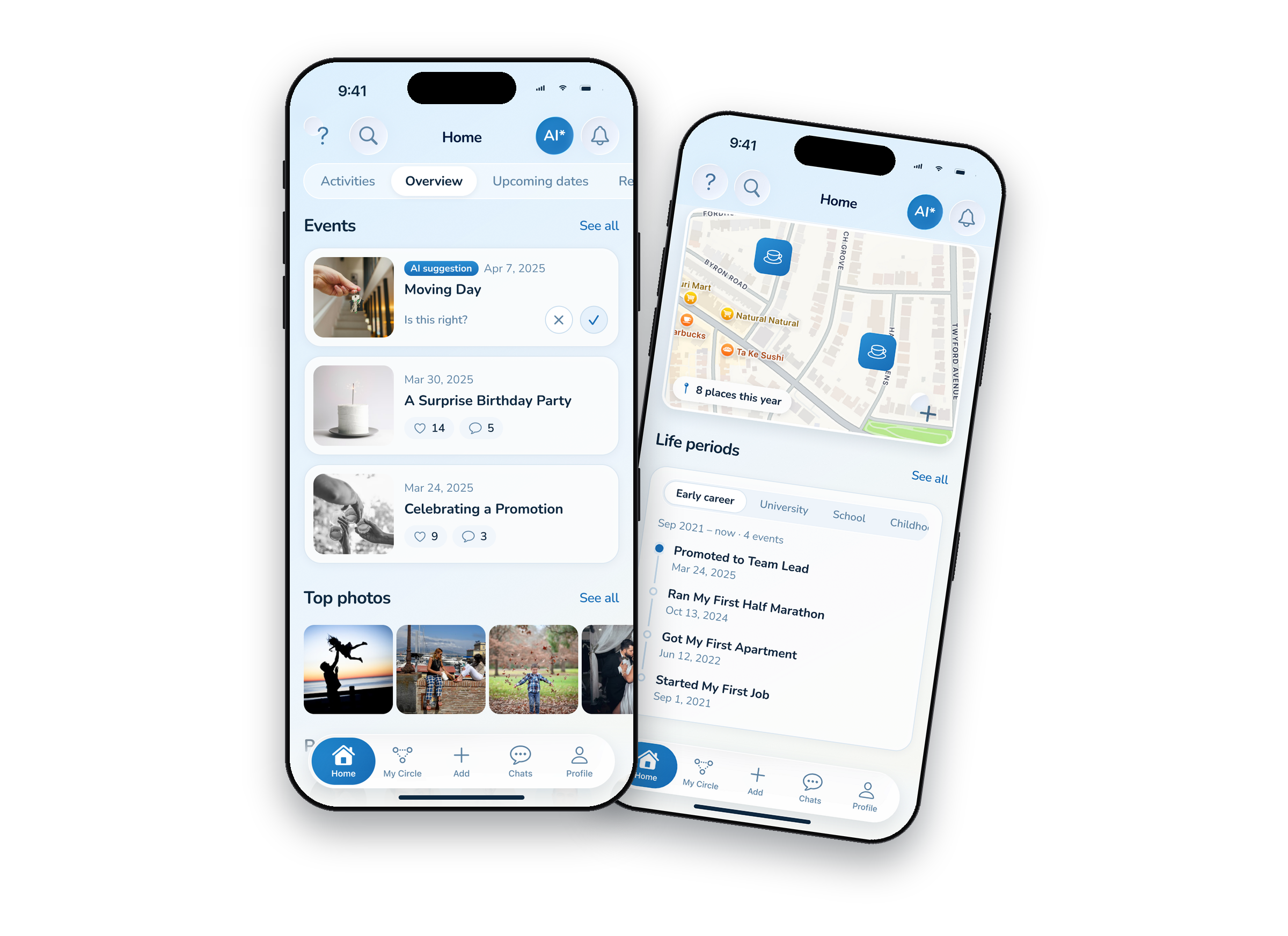

Home Dashboard UI: AI-detected events with confirm and reject, top photos, people, places on a map and life periods
UI: the Home Dashboard, with AI finds to confirm or reject in place.
Wireframe
UI
What the client got → my UI: the same Memory Circle feed. Scroll both.
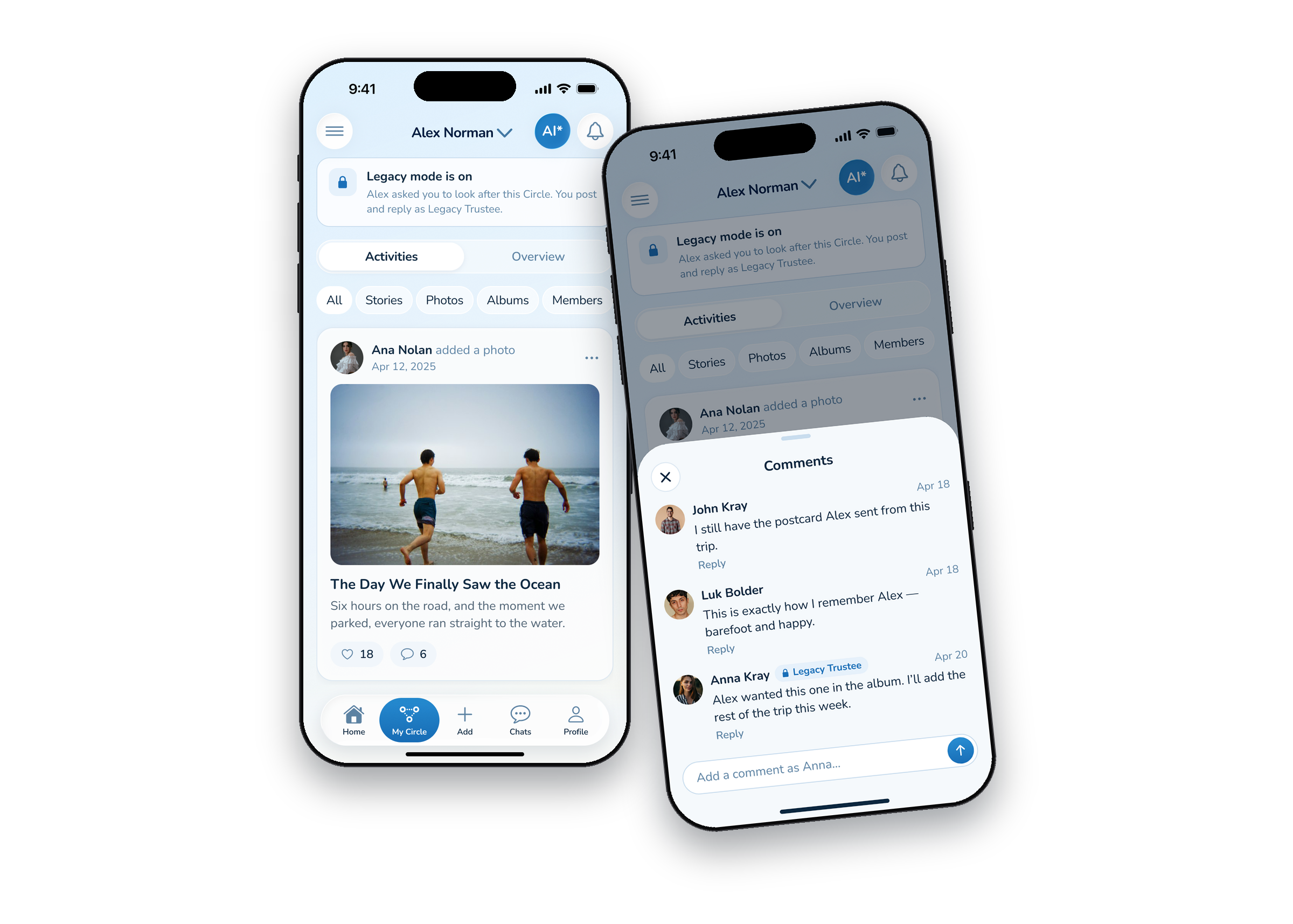
The Memory Circle in Legacy mode seen by the Trustee, and comments with the “Legacy Trustee” badge
Legacy in UI: the Circle the Trustee looks after, and a comment with the “Legacy Trustee” badge.
Results

A product logic the client signed off on.

Flows and wireframes for every role, an IA rebuilt from scratch, and a master spec where each decision keeps its reason and each open question its owner. The app isn’t built yet, so there’s nothing to measure; this is what the design gives it:
What the design changes
PeopleAI does the sorting; a person makes every call.
FamiliesEveryone knows what they can do, in every Circle.
LegacyThe owner’s plan runs even if one person can’t act.
Learnings
01Consent is a flow, not a checkbox. It needs a request, an answer, and a way back.
02Plan for the day nobody is there. A legacy flow needs a fallback, because the person who should act may not be able to.
03Let AI ask, not assume. A question at the right moment, like “Who’s in this photo?”, keeps people in control without slowing them down.
Next case